Integrating the Apple Procreate Lettering Brush into Professional Digital Workflows
In the evolving landscape of digital illustration and graphic design, tool selection is rarely about finding a single "magic" solution. Instead, it is about curating a toolkit that enhances precision, reduces friction, and supports consistent output. The Apple - Procreate Lettering Brush represents a specialized asset designed to bridge the gap between traditional hand-lettering aesthetics and modern digital efficiency. For professionals ranging from freelance illustrators to marketing entrepreneurs, understanding how this specific brush set functions within a broader creative pipeline is essential for maximizing its value.
This tool is not merely a preset; it is a calibrated instrument engineered for the iPad and Apple Pencil ecosystem. By leveraging advanced pressure sensitivity, it allows for dynamic thick-to-thin width variation, mimicking the natural response of ink on paper. This article explores how to integrate this brush into various professional workflows, from initial sketching to final polished deliverables, ensuring that creators can maintain high standards of quality control and aesthetic consistency.
Understanding the Dual-Version Architecture
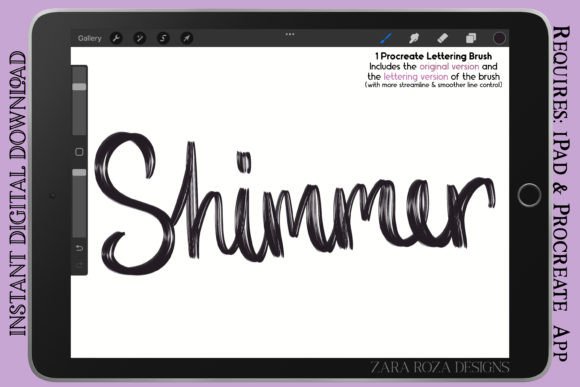
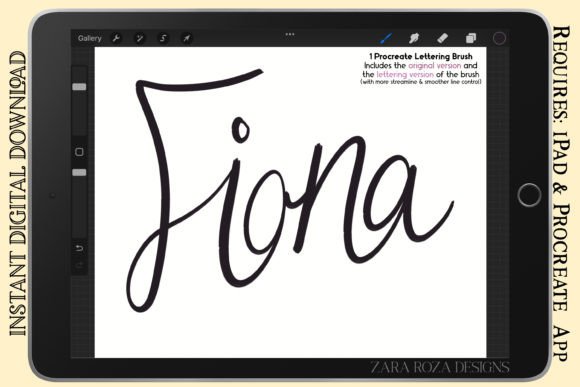
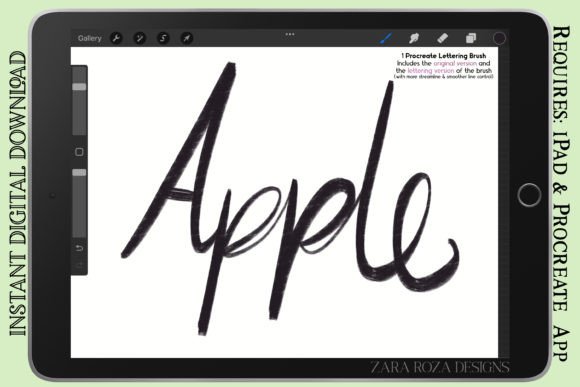
One of the most practical features of the Apple - Procreate Lettering Brush is its inclusion of two distinct versions within a single compressed .zip folder. This dual-approach addresses the varying needs of different stages in the creative process. Understanding when to deploy each version is key to an efficient workflow.
- The Original Version (Regular Line Control): This variant is optimized for rough sketching, initial concepting, and types of lettering that benefit from a more organic, textured feel. It provides a tactile response that suits bold illustration, line art, and cartoons where perfect smoothness is less critical than character and energy.
- The Lettering Version (Smooth Line Control): Designed for refinement, this version offers streamlined line control. It is ideal for final hand lettering, calligraphy, and projects requiring crisp, clean edges. This version minimizes jitter and ensures that curves remain fluid, making it suitable for graphic design elements, fashion sketches, and detailed comic digital art.
By having both options available, creators can switch contexts without changing tools entirely. You might begin a manga character design with the Original Version to capture the raw energy of the pose, then switch to the Lettering Version for adding dialogue bubbles or refining the line art for publication.
Pre-Production: Sketching and Conceptualization
Before any final asset is created, the planning phase requires tools that encourage rapid iteration. The Apple - Procreate Lettering Brush fits seamlessly into this early stage, particularly for projects involving typography-heavy designs such as logos, book covers, or social media graphics.
During the sketching phase, use the Original Version to draft layout structures. Its pressure sensitivity allows for quick blocking of heavy strokes and fine details simultaneously. For educators and bloggers creating visual aids, this stage is crucial for mapping out information hierarchy. The brush’s responsiveness ensures that the digital experience feels intuitive, reducing the cognitive load associated with fighting against rigid digital lines. This allows the creator to focus on composition and balance rather than technical adjustments.
Furthermore, for those involved in fashion sketches or portrait art, the initial rough-in phase benefits from the brush’s ability to vary width dynamically. This helps in establishing weight and form quickly, providing a solid foundation for subsequent detailing layers.
Production: Execution Across Diverse Mediums
The core utility of the Apple - Procreate Lettering Brush shines during the production phase. Whether you are working on anime, chibi character art, or intricate doodles, the brush’s versatility supports a wide range of artistic styles. Here is how it integrates into specific professional domains:
Hand Lettering and Calligraphy
For calligraphers and typographers, consistency is paramount. The Lettering Version provides the stability needed for smooth, flowing scripts. When executing complex ligatures or decorative flourishes, the pressure sensitivity ensures that transitions between thick downstrokes and thin upstrokes are natural. This reduces the need for excessive post-production cleanup, saving time for freelancers working on tight deadlines.
Comic and Manga Creation
Comic artists require tools that can handle both expressive character lines and precise text integration. This brush set serves a dual purpose here. Use the Original Version for outlining characters and adding texture to backgrounds, giving the art a vintage, hand-drawn aesthetic. Then, switch to the Lettering Version for speech bubbles and sound effects. The ability to maintain a cohesive visual language across both art and text strengthens the overall narrative impact.
Graphic Design and Branding
Small business owners and marketers often need to create bespoke assets that stand out from stock imagery. Using this brush for custom headers, quote graphics, or logo elements adds a human touch to digital brands. The retro vintage aesthetic inherent in the brush’s design aligns well with current trends favoring authenticity and nostalgia. By incorporating these elements directly in Procreate, designers can iterate rapidly before moving vectors into other software for final scaling.
Post-Production and Quality Control
Even with a high-quality brush, the final output depends on proper file management and review processes. The Apple - Procreate Lettering Brush comes in the standard .brush file format, packaged in a .zip folder. This ensures compatibility and ease of installation across devices.
To maintain quality control, consider the following implementation tips:
- Layer Organization: Keep your lettering or line art on separate layers from background colors and textures. This non-destructive workflow allows you to adjust opacity, blending modes, or color balances without affecting the integrity of the brush strokes.
- Zoom and Refine: While the Lettering Version is designed for smoothness, zooming in during the final review can reveal minor imperfections. Use Procreate’s streamlining settings in conjunction with the brush if additional stabilization is required for extremely long, sweeping lines.
- Export Standards: When finalizing work for print or web, ensure that the resolution matches the intended output. The detail captured by the pressure sensitivity is best preserved in high-resolution PNG or TIFF formats, while JPEGs may compress subtle line variations.
Integration with Other Tools and Resources
No tool exists in isolation. The Apple - Procreate Lettering Brush is most effective when viewed as part of a larger ecosystem. For instance, after creating initial sketches or lettering in Procreate, many professionals export their work to Adobe Illustrator for vectorization, or to Photoshop for advanced compositing. The clean lines produced by the Lettering Version make this transition smoother, as automated tracing tools perform better with consistent stroke widths.
Additionally, for educators and content creators, this brush can be used to annotate videos or create thumbnail art. The speed at which one can produce legible, aesthetically pleasing text enhances the overall production value of multimedia projects. It interacts well with other Procreate assets, such as texture overlays or color palettes, allowing for a rich, layered final product that feels both digital and analog.
Long-Term Usability and Skill Development
Investing in a specialized brush like the Apple - Procreate Lettering Brush is also an investment in skill development. Because it mimics traditional media, it encourages users to refine their hand-eye coordination and pressure control. Over time, regular use leads to greater muscle memory, allowing for faster execution and more confident strokes.
For hobbyists and productivity-minded users, this translates to a more enjoyable creative routine. The reduced friction between idea and execution means that doodling, journaling, or sketching becomes a viable daily practice rather than a cumbersome task. This consistency builds a portfolio of work over time, which can be leveraged for professional opportunities or personal satisfaction.
In conclusion, the Apple - Procreate Lettering Brush is a versatile, process-oriented tool that supports a wide array of creative workflows. By understanding the distinct roles of its two versions and integrating them thoughtfully into your planning, execution, and review phases, you can enhance both the efficiency and quality of your digital art. Whether you are drafting a comic, designing a brand identity, or simply exploring aesthetic painting, this brush provides the control and character needed to bring your vision to life.