Integrating the Pigeon Silhouette Style Procreate Brush into Your Digital Design Workflow
In the fast-paced world of digital illustration and graphic design, efficiency is not just a luxury; it is a necessity. Whether you are a freelance illustrator managing tight deadlines, a small business owner creating marketing materials, or a hobbyist looking to streamline your creative process, the tools you choose define your output quality and speed. The Pigeon Silhouette Style Procreate Brush represents a specialized asset designed to bridge the gap between hand-drawn authenticity and digital scalability. This article explores how this specific brush set fits into broader creative workflows, offering practical insights on implementation, compatibility, and strategic use across various design projects.
Understanding the Asset: More Than Just a Stamp
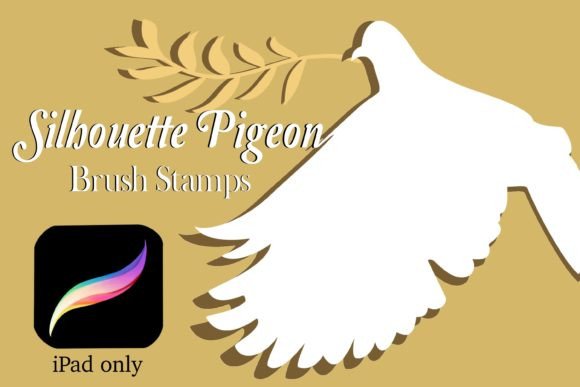
At its core, the Pigeon Silhouette Style Procreate Brush is a collection of 17 distinct silhouette stamps. This set includes 16 unique pigeon silhouettes and one olive branch stamp, all crafted with a hand-drawn aesthetic. While it may seem like a simple collection of images, its value lies in its integration within the Procreate ecosystem. Unlike static PNG files that require manual resizing and layer management for every instance, these brushes are dynamic. They allow for immediate adjustment in size, rotation, and color directly within the canvas environment.
For professionals, understanding the nature of this asset is crucial. It is not a standalone software but a plugin-like enhancement for the Procreate app. This means its utility is entirely dependent on your existing hardware and software setup. Specifically, it requires an iPad, an Apple Pencil or compatible stylus, and Procreate app version 5.0 or higher. Recognizing these prerequisites early in your planning phase prevents workflow interruptions and ensures seamless integration from the moment you download the file.
Strategic Placement in the Creative Process
Effective use of the Pigeon Silhouette Style Procreate Brush depends on knowing where it fits in your project timeline. It is rarely the starting point of a complex illustration but serves as a powerful accelerator during the detailing and embellishment phases. Here is how it interacts with different stages of a typical design workflow:
Pre-Production and Planning
Before opening Procreate, consider the thematic relevance of the pigeon silhouette. Pigeons often symbolize peace, communication, or urban life, while the olive branch reinforces themes of harmony and resolution. If you are designing a wedding invitation, a peace rally banner, or a brand identity for a wellness startup, these symbols are semantically rich. Planning their usage beforehand allows you to reserve space in your composition, ensuring the stamps do not clutter the design but rather enhance its narrative.
Execution and Layering
During the active design phase, the brush set shines in its versatility. Because the brushes are vector-like in their scalability (though raster-based in Procreate), you can place a tiny pigeon in the corner of a business card or scale it up for a large poster without significant loss of clarity, provided you start with a high-resolution canvas. The ability to change colors instantly allows for rapid A/B testing. You can try a black silhouette for a classic look, then switch to a soft pastel to match a spring-themed campaign, all without leaving the brush menu.
This immediacy supports an iterative design process. Instead of committing to one color or size, you can experiment freely. This is particularly useful for marketers and entrepreneurs who need to visualize multiple concepts quickly before finalizing a design for print or digital publication.
Post-Production and Export
Once the silhouettes are placed, they interact with other layers just like any other brush stroke. You can apply blending modes, add textures, or use clipping masks to integrate the pigeons into complex backgrounds. For sublimation graphics or sticker designs, this flexibility is vital. You can ensure the silhouette contrasts well against the background material by adjusting opacity or adding a subtle glow effect, ensuring the final product looks professional regardless of the medium.
Technical Implementation and Usability
The technical barrier to entry for this tool is low, which is a significant advantage for users who are not technically inclined. The installation process is straightforward: download the ZIP file, unzip it, and tap the .brushset file. Procreate automatically imports the brushes into your library. This ease of use reduces friction, allowing you to focus on creativity rather than troubleshooting software issues.
However, efficient workflow management goes beyond installation. To maximize the utility of the Pigeon Silhouette Style Procreate Brush, consider organizing your brush library. Create a dedicated folder for "Stamps" or "Silhouettes" within Procreate. This keeps your workspace clean and ensures that these specific tools are easily accessible when needed. For freelancers juggling multiple clients, such organization saves valuable minutes that add up over weeks and months.
Furthermore, understanding the settings available within each brush is key. You can adjust the spacing, size jitter, and rotation randomness if you want to create a scattered flock effect rather than placing individual birds manually. This feature transforms the brush from a simple stamp tool into a generative design element, allowing for more organic and natural-looking compositions.
Use Cases Across Industries
The versatility of the 17-stamp set makes it applicable across a wide range of industries and project types. Here are several practical applications:
- Print-on-Demand and Merchandise: Entrepreneurs selling t-shirts, mugs, or tote bags can use the pigeon silhouettes to create minimalist, trendy designs. The hand-drawn style appeals to consumers looking for artisanal aesthetics rather than generic clipart.
- Digital Stationery and Invitations: Wedding planners and graphic designers can incorporate the olive branch and pigeon motifs into save-the-date cards, menus, and thank-you notes. The ability to change colors allows for perfect matching with wedding palettes.
- Social Media Content: Marketers can use these stamps to create eye-catching headers for blog posts or Instagram stories. A simple pigeon silhouette can serve as a bullet point or a decorative divider, adding visual interest to text-heavy content.
- Educational Materials: Educators creating worksheets or presentations about nature, history, or symbolism can use these clear, recognizable shapes to illustrate concepts without distracting from the educational content.
Quality Control and Consistency
When integrating third-party assets like the Pigeon Silhouette Style Procreate Brush into professional work, maintaining consistency is paramount. Because these are hand-drawn designs, they possess a certain organic irregularity that adds charm but requires careful handling. Ensure that the line weight and style of the silhouettes match the rest of your design elements. If you are combining them with geometric shapes or modern typography, consider how the contrast affects the overall balance.
Additionally, always check the resolution requirements for your final output. For web use, standard Procreate canvas settings are usually sufficient. However, for large-format printing or sublimation, start with a larger canvas size to ensure the edges of the silhouettes remain crisp. This proactive approach to quality control prevents costly reworks and ensures client satisfaction.
Long-Term Value and Community Engagement
Investing in specialized brush sets like this one is not just about a single project; it is about building a robust toolkit that enhances your long-term productivity. As you become familiar with the nuances of the pigeon stamps, you will develop shortcuts and techniques that speed up your workflow. Over time, these small efficiencies contribute to significant time savings, allowing you to take on more projects or dedicate more time to creative exploration.
Moreover, supporting creators who develop high-quality, niche assets encourages further innovation in the digital art community. If you find the Pigeon Silhouette Style Procreate Brush useful, consider leaving feedback or following the store. This not only helps the creator improve their products but also keeps you informed about new releases that might complement your existing toolkit. Staying updated with new resources ensures your workflow remains current and competitive.
In conclusion, the Pigeon Silhouette Style Procreate Brush is a practical, versatile tool that fits seamlessly into various digital design workflows. By understanding its technical requirements, strategic placement, and diverse use cases, you can leverage this asset to enhance efficiency, maintain quality, and elevate your creative output. Whether you are designing a simple sticker or a complex banner, this brush set offers the flexibility and charm needed to bring your vision to life.