Shimmer - Procreate Lettering Brush: A Practical Guide for Digital Creators
If you have spent any time scrolling through digital art communities on Instagram or Pinterest, you have likely noticed a distinct shift toward retro-inspired aesthetics. There is something undeniably charming about hand-drawn lettering that mimics the imperfections of vintage print and analog markers. This is where Shimmer - Procreate Lettering Brush enters the conversation. It is not just another tool in an endless library of downloads; it is a specialized instrument designed to bridge the gap between traditional tactile feedback and the convenience of iPad creation.
For many creators, the struggle with digital lettering lies in achieving natural line variation. Standard brushes often feel too uniform or sterile. Shimmer addresses this by offering pressure sensitivity that genuinely responds to the weight of your Apple Pencil, creating thick-to-thin transitions that feel organic rather than algorithmic. Whether you are a seasoned graphic designer or a hobbyist looking to elevate your journaling, understanding how this brush functions can significantly change your workflow.
Why Line Control Matters in Digital Hand Lettering
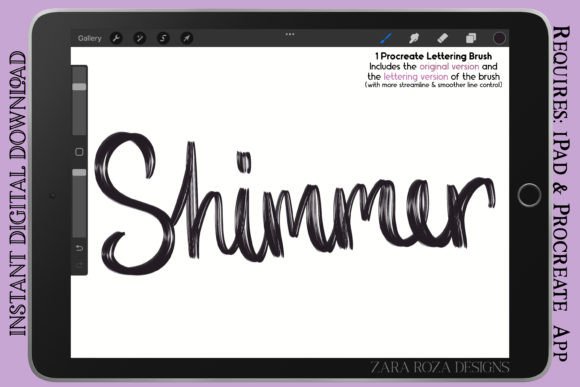
The core value of any lettering brush is its predictability. When you are drafting a logo or a social media quote, you need to know exactly how the line will behave before it hits the canvas. Shimmer comes with two distinct versions, a feature that many users overlook but should prioritize during their setup phase.
The Original Version offers regular line control. This variant retains a bit of texture and resistance, making it ideal for rough sketching, casual doodles, or projects where you want a raw, unpolished look. It suits artists who prefer a bit of friction in their strokes, mimicking the feel of a marker on textured paper. On the other hand, the Lettering Version is streamlined. It smooths out the jitter, providing cleaner curves and more consistent widths. This is the go-to choice for final pieces, bold illustrations, and professional calligraphy where precision is paramount.
Having both options in a single compressed .zip folder means you do not need to switch tools mid-project. You can sketch loosely with the Original version and then refine your outlines with the Lettering version, maintaining a cohesive aesthetic throughout the process.
Real-World Applications for Freelancers and Entrepreneurs
Beyond personal art, this tool has practical applications for small business owners and marketers. Consider the freelance graphic designer who needs to create custom assets for a client’s branding package. Using Shimmer, they can draft unique logotypes that stand out from generic font libraries. The retro vintage aesthetic appeals to brands in the coffee, boutique retail, and artisanal food sectors, where authenticity is a key selling point.
Similarly, content creators and bloggers can use this brush to design eye-catching headers for their websites or thumbnails for YouTube videos. Hand-lettered titles often perform better in click-through rates because they feel personal and inviting. Instead of spending hours in vector software, an entrepreneur can sketch a compelling title in minutes directly on their iPad, leveraging the pressure sensitivity to add emphasis to key words.
Expanding Beyond Lettering: Illustration and Character Design
While the name suggests a focus on typography, the versatility of Shimmer extends into broader illustration tasks. The liner pen quality makes it excellent for outlining detail in bold illustrations and line art. Comic artists and manga creators will appreciate the consistency of the stroke when drawing speech bubbles or defining character features.
For those interested in character design, such as anime or chibi character art, the brush allows for expressive linework. You can vary the line weight to suggest depth and volume without switching to a shading tool. Fashion sketches also benefit from this dynamic range; a quick flick of the wrist can create the flowing line of a dress hem, while a heavier press defines the structure of a jacket. Even portrait artists can use the smoother version to map out facial features with precision before moving to color.
Educational and Lifestyle Uses
Educators and students are increasingly adopting digital note-taking, and Shimmer offers a stylish alternative to standard handwriting fonts. When creating study guides, presentation slides, or educational worksheets, using hand-lettered headers can make material more engaging. The aesthetic painting quality of the brush allows teachers to add decorative elements that capture student attention without appearing cluttered.
In the lifestyle sector, digital planners and journal enthusiasts use this brush to elevate their daily logs. Drawing makeup charts, tracking habits, or designing weekly spreads becomes a creative outlet rather than a chore. The ability to create stylized illustration elements alongside functional text turns a simple planner into a piece of art. It encourages mindfulness and creativity in everyday routines, proving that utility and beauty can coexist.
What to Consider Before Downloading
Before adding Shimmer to your Procreate app, it is important to assess your current hardware and skill level. While the brush is designed to be user-friendly, getting the most out of its pressure sensitivity requires a calibrated Apple Pencil. Ensure your iPad settings are optimized for palm rejection and pressure curve adjustments. If your lines feel too jagged, you may need to tweak the streamline settings within Procreate itself, although the Lettering Version of Shimmer already accounts for much of this.
Additionally, consider your project goals. If you are looking for hyper-realistic pencil textures, this might not be the primary tool you need. However, if your aim is bold, graphic, and retro-inspired output, it fits perfectly. It is also worth noting that the file format is .brush, contained within a .zip folder. Users unfamiliar with importing brushes may need to follow a quick tutorial on extracting files on iOS, but the process is straightforward once done.
Integrating Shimmer into Your Creative Workflow
To truly benefit from this tool, integrate it into a layered workflow. Start with a low-opacity sketch using the Original Version to map out your composition. Once satisfied, create a new layer and switch to the Lettering Version for your final ink lines. This separation allows for easy corrections without damaging your initial ideas. For comic digital art, use this method to keep panel borders clean while allowing character expressions to remain loose and energetic.
Experiment with blending modes as well. Because the brush has a distinct character, overlaying it with subtle textures or watercolor backgrounds can enhance the vintage vibe. Graphic designers can export these layers as PNGs with transparent backgrounds to use in other software like Photoshop or Canva, extending the utility of the brush beyond the Procreate ecosystem.
Ultimately, Shimmer - Procreate Lettering Brush is about empowering creators to produce work that feels human in a digital space. It removes the technical barriers that often discourage beginners while offering the nuance professionals demand. Whether you are drawing doodles, designing logos, or sketching fashion concepts, this tool provides the reliability and aesthetic charm needed to bring your vision to life. By understanding its dual versions and applying them to specific scenarios, you can streamline your creative process and produce higher quality work with less frustration.