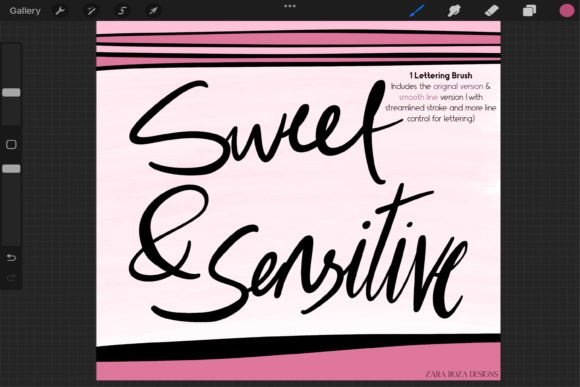
Sweet Sensitive Procreate Brush Guide
In the vast ecosystem of digital art tools, finding a resource that balances simplicity with versatility is often the most challenging part of the creative process. The Sweet Sensitive Procreate Brush addresses this need directly by offering a minimalist approach to modern lettering and illustration. It is not merely another texture pack; it is a functional tool designed to bridge the gap between rough sketching and polished final art. Whether you are a professional graphic designer refining a logo or a hobbyist creating chibi characters for social media, this brush set provides the pressure sensitivity and line control necessary to bring your ideas to life without unnecessary complexity.
The Core Philosophy of Minimalist Line Art
At its heart, the Sweet Sensitive Procreate Brush is built on the principle of solid opaque aesthetics. In an era where digital brushes often come loaded with complex grain textures, noise, and watercolor simulations, there is a distinct value in clarity. This brush delivers clean, confident strokes that respond intuitively to the Apple Pencil. The pressure sensitivity is calibrated to create natural thick-to-thin width variations, mimicking the behavior of traditional ink liners and calligraphy pens. This responsiveness allows artists to maintain rhythm and flow, which is essential for hand lettering and fluid line work.
The "sensitive" aspect of the name refers to how the brush interprets input from your stylus. A light touch yields fine details perfect for outlining facial features in portrait art or adding intricate patterns to fashion sketches. Conversely, applying more pressure instantly broadens the stroke, making it ideal for bold outlines in cartoons, comics, and manga. This dynamic range ensures that the artist remains in control, reducing the friction between conception and execution.
Understanding the Two Distinct Versions
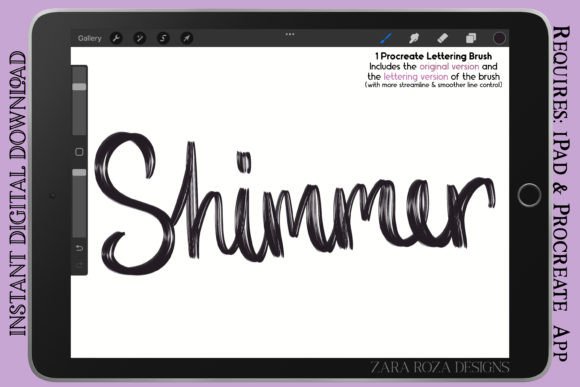
What truly sets this tool apart is the inclusion of two specialized versions within a single package. Each version serves a unique purpose in the artistic workflow, allowing users to switch contexts seamlessly without adjusting settings manually.
- Original Version (Regular Line Control): This iteration is designed for raw expression. It offers a slightly looser feel that excels in rough sketching, initial concept drawing, and styles of lettering that benefit from a human, imperfect touch. It captures the energy of the moment, making it perfect for brainstorming sessions or creating doodles that need to feel organic and spontaneous.
- Smooth Line Version: For projects requiring precision, the smooth line version provides a streamlined experience. It minimizes jitter and stabilizes the stroke, making it the superior choice for clean hand lettering, technical illustration, and detailed line art where consistency is paramount. This version is particularly useful when preparing artwork for print or high-resolution web display.
Practical Applications Across Creative Fields
The utility of the Sweet Sensitive Procreate Brush extends far beyond a single niche. Its adaptability makes it a staple for various professionals and enthusiasts working on the iPad. Here is how different creators can leverage its capabilities to enhance their specific workflows.
Hand Lettering and Typography
For those focusing on typography, the smooth line version is indispensable. It allows for the creation of elegant scripts and bold sans-serif headers with consistent weight. The pressure sensitivity enables the classic calligraphic contrast between downstrokes and upstrokes without the need for manual scaling. Designers can use this to craft custom logos, wedding invitations, or social media quotes that stand out due to their clean, vector-like quality while retaining the warmth of hand-drawn art.
Character Design and Illustration
In the realm of character art, particularly for anime, manga, and chibi styles, line confidence is key. The regular version helps in quickly blocking out character poses and expressions, capturing the essence of the design before committing to details. Once the composition is set, switching to the smooth line version allows for crisp, professional inking. This dual-approach workflow speeds up the production of comic pages, storyboards, and animated assets, ensuring that the final lines are free of wobbles and inconsistencies.
Fashion and Portrait Sketching
Fashion illustrators and makeup artists often require a tool that can handle both broad structural lines and minute details. The Sweet Sensitive Procreate Brush excels here, serving as a versatile liner pen for outlining garment silhouettes and detailing makeup charts. The ability to vary line weight naturally adds depth to sketches, distinguishing the front folds of a dress from the background elements. For portrait artists, it provides the delicate touch needed for eyelashes, hair strands, and lip contours, maintaining a realistic yet stylized aesthetic.
Optimizing Your Workflow with Sweet Sensitive
To get the most out of this brush, it is important to understand how to integrate it into a broader digital painting routine. Consistency and organization are vital for producing professional results, regardless of the medium.
Start by utilizing the Original Version for your initial layer. This allows you to experiment freely with composition and layout without worrying about perfection. Keep your strokes loose and energetic. Once the structure is established, create a new layer above it and switch to the Smooth Line Version. Trace over your best lines, using the pressure sensitivity to add weight and dimension. This method separates the creative exploration phase from the refinement phase, leading to cleaner final images.
Furthermore, consider the opacity settings. While the brush is designed to be solid and opaque, adjusting the opacity slider in Procreate can help create shading effects or softer outlines for background elements. This technique adds depth to illustrations without introducing additional colors or gradients, adhering to a minimalist color palette that is often preferred in modern graphic design.
Tips for Consistent Results
Maintaining a consistent style across multiple projects is crucial for building a recognizable brand, whether you are a freelancer or a small business owner. To achieve this with the Sweet Sensitive Procreate Brush:
- Standardize Your Pressure Settings: Ensure your iPad's pencil sensitivity is set to a level that feels comfortable but responsive. Test the brush on a blank canvas to find the sweet spot between too thin and too thick.
- Limit Your Color Palette: Pair the clean lines of this brush with a restricted color scheme. Solid opaque lines look best against flat colors or subtle gradients, avoiding visual clutter.
- Practice Stroke Economy: Train yourself to complete shapes in fewer strokes. The smooth line version rewards confidence; hesitation often leads to jagged lines. Practice continuous loops and curves to build muscle memory.
Why Simplicity Drives Creativity
Ultimately, the Sweet Sensitive Procreate Brush proves that powerful tools do not need to be complicated. By stripping away excessive textures and focusing on fundamental line quality, it empowers artists to focus on what truly matters: the idea itself. Whether you are drafting a marketing campaign, illustrating a children's book, or simply doodling for relaxation, this brush provides the reliable foundation needed to execute your vision. It transforms the iPad into a true sketchbook, offering the tactile satisfaction of traditional media with the flexibility of digital editing. Embrace the simplicity, explore the possibilities, and let your creativity flow with every stroke.