Mastering Spring Designs with the Easter Eggs Line-Art Set Procreate Brush
The arrival of spring brings a surge of creative demand for designers, illustrators, and hobbyists alike. Whether you are preparing digital assets for an online store, designing personalized greeting cards, or creating sublimation graphics for physical products, the need for high-quality, versatile imagery is constant. However, drawing intricate line art from scratch can be time-consuming, especially when deadlines are tight. This is where specialized tools become invaluable. The Easter Eggs Line-Art Set Procreate Brush offers a streamlined solution for creators who want to maintain artistic integrity while significantly reducing production time. By integrating this specialized brush set into your workflow, you can elevate your seasonal projects with professional-grade aesthetics without the steep learning curve associated with complex vector software.
Understanding the Tool: More Than Just Stamps
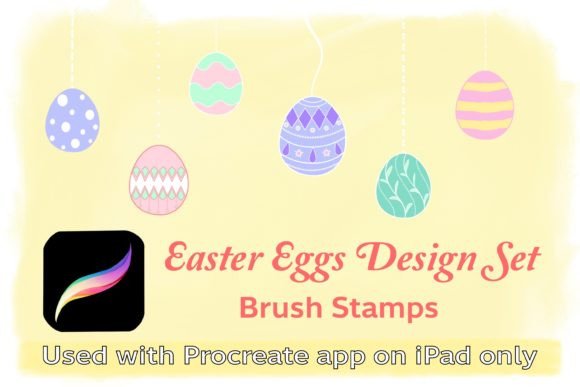
At its core, the Easter Eggs Line-Art Set Procreate Brush is a curated collection of twenty-five distinct design elements tailored specifically for the Procreate application on iPad. It is essential to understand that this is not merely a static image pack; it is a dynamic brush set. The collection includes fifteen unique hand-drawn line art Easter eggs and ten string line designs. These elements are engineered to function as stamp brushes, allowing you to place them instantly onto your canvas with a single tap.
What sets this tool apart is its flexibility. Unlike rigid clip-art that cannot be modified once placed, these brushes retain the editable properties of digital paint. You can adjust the size of each egg or string line to fit your composition perfectly. Furthermore, because they are vector-like in their scalability within the raster environment of Procreate, you can change colors, adjust opacity, and modify blending modes to suit your specific project needs. This level of control ensures that your designs remain unique and customized, avoiding the generic look often associated with pre-made assets.
Addressing Common Creative Challenges
Many digital artists face a common dilemma during peak seasonal periods: the balance between quality and quantity. Creating original line art for every single Easter egg in a pattern or banner is labor-intensive. It requires steady hands, consistent styling, and significant time investment. For small business owners who handle their own marketing materials, this time cost can be prohibitive.
The Easter Eggs Line-Art Set Procreate Brush addresses this challenge by providing a library of professionally drawn, cohesive designs. The hand-drawn nature of the lines ensures that the output feels organic and authentic, rather than sterile or computer-generated. This helps bridge the gap between efficiency and artistry. Additionally, users often struggle with consistency when drawing multiple elements manually. With this brush set, every egg shares the same stylistic DNA, ensuring that your banners, stickers, and labels look like part of a unified brand identity.
Practical Applications for Diverse Projects
The versatility of this brush set extends far beyond simple illustrations. Here are several practical ways to implement these designs into your workflow:
- Digital Stationery and Greeting Cards: Combine the line art eggs with pastel backgrounds and handwritten typography to create heartfelt Easter cards. The ability to change line colors allows you to match specific brand palettes or personal preferences.
- Sublimation Graphics: For those involved in print-on-demand services, these high-contrast line arts are ideal for sublimation printing on mugs, t-shirts, and tote bags. The clean lines transfer well and allow for easy coloring by end-users if you are selling digital coloring pages.
- Social Media Banners and Stories: Use the string line brushes to create decorative borders or dividers in your Instagram stories or Pinterest pins. The fifteen egg designs can be scattered across backgrounds to create engaging, festive visuals that stop the scroll.
- Product Labels and Packaging: Small businesses selling homemade goods like jams, cookies, or candles can use these stamps to create charming, artisanal labels. The hand-drawn aesthetic adds a touch of warmth and craftsmanship that appeals to consumers.
- Sticker Design: Create die-cut sticker sheets by placing the eggs on transparent layers. The scalable nature of the brushes means you can create everything from tiny planner stickers to large laptop decals.
Technical Requirements and Setup
To utilize the Easter Eggs Line-Art Set Procreate Brush effectively, you must ensure your hardware and software meet the necessary specifications. This tool is exclusively designed for the Procreate app, meaning it is not compatible with Photoshop, Illustrator, or other desktop-based design software. You will need an iPad paired with an Apple Pencil or a compatible stylus pen to achieve the best precision and user experience.
Regarding software, your Procreate app must be version 5.0 or higher. This ensures compatibility with the latest brush engine features that allow for smooth stamping and resizing. The installation process is straightforward and user-friendly. Upon purchase, you will receive a zip file containing the .brushset file. Simply download the file to your iPad, unzip it, and tap once on the brush file. Procreate will automatically import the entire set into your brush library, ready for immediate use. There is no need for complex configuration or manual installation steps, making it accessible even for beginners.
Tailoring the Approach: From Beginners to Professionals
Different users will find unique value in this tool depending on their skill level and goals. For beginners, the Easter Eggs Line-Art Set Procreate Brush serves as an excellent educational resource. By studying how the lines are constructed and how the stamps behave, new users can learn about composition, spacing, and color theory without the pressure of drawing perfect shapes from scratch. It allows them to produce professional-looking results early in their creative journey, boosting confidence and motivation.
For professional illustrators and graphic designers, the brush set acts as a productivity multiplier. Instead of spending hours drafting base shapes, professionals can use these stamps as underlays or foundational elements. They can then layer additional textures, shadows, and highlights to create complex, multi-dimensional artworks. The time saved on the initial sketching phase can be redirected toward refining details, experimenting with lighting, or managing client communications.
Maximizing Your Creative Output
To get the most out of this resource, consider experimenting with the brush settings. While the default stamps are ready to use, Procreate allows you to tweak parameters such as jitter, scatter, and rotation if you wish to create custom variations of the brushes themselves. You might also try combining the egg stamps with different background textures—such as watercolor washes or paper grains—to add depth and tactile appeal to your digital designs.
Remember that the key to successful design is not just the tools you use, but how you combine them. Use the string line brushes to connect elements, guide the viewer’s eye, or frame your central subjects. Mix and match the fifteen egg designs to avoid repetition in larger patterns. By treating these brushes as building blocks rather than final products, you unlock endless creative possibilities.
If you find value in this tool and it enhances your workflow, consider leaving a comment to share your experience. Following the store ensures you stay updated on new product releases, keeping your digital toolkit fresh and relevant for upcoming seasons and holidays. Embrace the ease and elegance of the Easter Eggs Line-Art Set Procreate Brush and transform your seasonal design process today.