Designing Festive Treats with the Procreate Christmas Cookie Alphabet
The holiday season brings a unique blend of warmth, tradition, and creative opportunity. For digital artists, bakers, and small business owners, this time of year is often defined by the rush to create engaging content, packaging designs, and social media graphics that capture the spirit of giving. One of the most effective ways to elevate these projects is by incorporating whimsical, hand-drawn elements that feel personal and inviting. This is where the Procreate Christmas Cookie Alphabet becomes an invaluable resource. By combining the tactile charm of baked goods with the flexibility of digital design, this specialized brush set allows creators to infuse their work with a fun, festive vibe that resonates deeply with audiences.
Understanding the Appeal of Hand-Drawn Holiday Typography
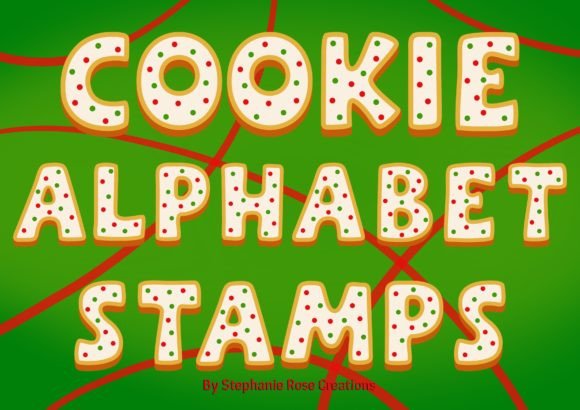
In a digital landscape saturated with polished, corporate aesthetics, there is a growing demand for authenticity. Consumers are drawn to designs that feel handmade, cozy, and imperfect in a charming way. The concept behind the Procreate Christmas Cookie Alphabet taps directly into this desire. It transforms standard typography into something edible and delightful, mimicking the look of gingerbread men, sugar cookies, and frosted treats. Each letter is designed to look like it has been freshly baked, complete with icing details, sprinkles, and textured edges.
For many users, the challenge lies in replicating this specific aesthetic from scratch. Drawing realistic cookie textures, managing consistent icing flows, and ensuring legibility while maintaining a playful style can be time-consuming. Traditional methods might involve photographing actual cookies, which requires baking skills, lighting setups, and extensive editing. Alternatively, using generic holiday fonts often results in a sterile look that lacks the organic warmth of real baked goods. The Procreate Christmas Cookie Alphabet solves these problems by providing pre-designed, high-quality assets that are ready to use within the Procreate app on iPad.
Practical Applications for Digital Creators
The versatility of this tool extends far beyond simple greeting cards. Understanding how to integrate these cookie-themed letters into various projects can significantly enhance your creative output. Here are several practical ways to utilize this resource:
- Social Media Graphics: Create eye-catching posts for Instagram or Pinterest. Use the alphabet to spell out holiday greetings, sale announcements, or recipe titles. The visual appeal of cookie letters stops the scroll and encourages engagement.
- Packaging Design: If you run a small bakery or sell handmade gifts, use the Procreate Christmas Cookie Alphabet to design labels, stickers, and box inserts. The cohesive look adds a professional yet personal touch to your branding.
- Digital Invitations: Design unique e-cards for holiday parties or family gatherings. The playful nature of the font sets a joyful tone before the event even begins.
- Print-on-Demand Products: Incorporate the letters into designs for t-shirts, mugs, and tote bags. The whimsical style appeals to customers looking for cute, seasonal merchandise.
When using these assets, consider layering them with other elements to create depth. For instance, place the cookie letters over a subtle background texture like kraft paper or a soft knit pattern. This enhances the cozy atmosphere and makes the design feel more tangible.
Enhancing Designs with Christmas Cookie Stamps
While the alphabet provides the structure for your text, adding complementary elements can take your designs to the next level. This is where Christmas cookie stamps come into play. These digital stamps often include icons such as snowflakes, holly leaves, candy canes, and additional cookie shapes. When used in conjunction with the Procreate Christmas Cookie Alphabet, they create a unified visual language.
Think of the stamps as the decorative icing on your design cake. You might use a snowflake stamp to dot the "i" in a word or scatter candy cane icons around the border of your composition. The key is balance. Overloading a design with too many elements can make it look cluttered. Instead, use the stamps strategically to guide the viewer’s eye and reinforce the theme. For example, if you are designing a logo for a holiday bake sale, use the cookie alphabet for the main title and a single, well-placed stamp icon as a focal point.
Tailoring Your Approach to Different User Needs
Different creators will approach the Procreate Christmas Cookie Alphabet with varying goals and skill levels. Understanding these differences can help you maximize the tool’s potential.
For Beginners: If you are new to Procreate, start by experimenting with the basic strokes. Type out simple words like "Joy," "Noel," or "Eat." Focus on learning how to adjust the size and color of the letters. Procreate allows you to change the hue of each letter individually, so try creating a rainbow effect or sticking to traditional red and green palettes. Do not worry about perfection; the charm of cookie designs lies in their slight irregularities.
For Intermediate Users: Explore layer styles and blending modes. Add drop shadows to give the cookies a 3D effect, making them appear as if they are sitting on top of the page. Experiment with texture brushes to add a crumbly effect to the edges of the letters. You can also combine the cookie alphabet with hand-lettering for a mixed-media look, using the digital assets for emphasis words and your own handwriting for secondary text.
For Professionals: Consider licensing and commercial use. Ensure you understand the terms of use for the Procreate Christmas Cookie Alphabet if you plan to sell products featuring these designs. Professionals can also use these assets as a base for further customization. Import the letters into vector software like Adobe Illustrator if you need scalable graphics for large-format printing, although keeping them in Procreate maintains the authentic digital paint texture.
Overcoming Common Design Challenges
Even with high-quality tools, designers may face hurdles. One common issue is legibility. Because the Procreate Christmas Cookie Alphabet is highly stylized, some letters may be harder to read at smaller sizes. To address this, avoid using long paragraphs of text in this font. Reserve it for headlines, short phrases, or single words. If you must use it for longer text, increase the spacing between letters and lines to improve readability.
Another challenge is color coordination. The default colors of the cookie brushes may not match your brand palette. Fortunately, Procreate makes it easy to recolor any element. Use the color picker tool to sample colors from your existing branding materials and apply them to the cookie letters. This ensures that your festive designs remain on-brand while still capturing the holiday spirit.
Maximizing Efficiency and Creativity
To get the most out of your workflow, organize your layers effectively. Keep the cookie alphabet on separate layers from the background and any stamp elements. This non-destructive approach allows you to move, resize, or recolor individual letters without affecting the rest of the design. Additionally, save your favorite combinations as templates. If you frequently create social media posts, having a pre-set file with the Procreate Christmas Cookie Alphabet already loaded can save valuable time during the busy holiday season.
Remember that the goal is to evoke emotion. The sight of a gingerbread letter or a frosted cookie triggers feelings of nostalgia and comfort. By using these digital tools thoughtfully, you are not just creating graphics; you are crafting experiences. Whether you are a baker looking to promote your latest batch of treats or a designer creating holiday campaigns, the Procreate Christmas Cookie Alphabet offers a delightful solution that bridges the gap between digital precision and homemade charm.
In conclusion, integrating festive, food-inspired typography into your work is a powerful way to stand out during the holiday season. By leveraging the Procreate Christmas Cookie Alphabet and complementing it with strategic use of Christmas cookie stamps, you can create designs that are not only visually appealing but also emotionally resonant. Embrace the creativity, experiment with different layouts, and let the joy of the season shine through your digital art.